Construction Quote Follow-Up Automation
Saikiran Solanki
13 June 2026
Are You Losing Revenue After Sending Quotes?
You spend hours preparing a quote.
You send it to the client, tell yourself you will follow up next week, then another project takes over.
A supplier calls. A site issue comes up. A client wants an update. By the time you remember the quote, the job may already be gone.
Most builders do not lose every quote on price. Some quotes are lost because nobody followed up at the right time.
That is the problem this automation fixes.
Free Construction Workflow Review → Get a custom automation plan for your quote follow-up process.
The Problem
For many builders, quote follow-up is still handled through memory, inbox flags, spreadsheets, and scattered notes.
A typical broken process looks like this:
- You prepare a quote or proposal.
- You email it to the client.
- You save a PDF somewhere.
- You add a note in Excel or Google Sheets.
- You plan to follow up in a few days.
- The team gets busy.
- Nobody follows up.
- The client chooses someone else.
If you send 20 quotes per month, even a few missed follow-ups can become expensive.
A single residential renovation, fit-out, or trade job can be worth thousands of dollars.
The real cost is not the admin time. It is the work you never knew you could have won.
This usually shows up in three ways.
Missed Follow-Ups
Quotes go out, but no one owns the next step.
The client may be interested, but your team only follows up when someone remembers.
No Central Visibility
Quote information may sit across:
- Outlook
- Gmail
- Microsoft 365
- PDF folders
- Excel
- Google Sheets
- Phone calls
No one has one clean view of open opportunities.
No Clear Pipeline
You may know what projects are active today.
But you may not know which quoted jobs could turn into work next month.
That makes planning harder than it needs to be.
Solution Overview
This automation tracks every quote after it leaves your inbox.
It can:
- Detect quote emails
- Create quote records
- Schedule follow-up tasks
- Generate polite follow-up drafts
- Detect client replies
- Update quote status
- Send weekly pipeline reports
Your team can keep sending quotes the same way. The system handles the tracking after that.
The setup stays flexible.
Email Platforms
- Outlook
- Microsoft 365
- Gmail
Automation Platforms
- Make
- n8n
- Zapier
Databases
- Airtable
- Google Sheets
AI
- OpenAI API
For many Australian builders, the best starting stack is Microsoft 365, Make, Airtable, and OpenAI.
But the right tools depend on how you already work.
Example Workflow
Sarah runs a small renovation business in Melbourne.
On Monday, she sends a $15,000 bathroom renovation quote to John.
Day 0
Sarah emails the quote from Outlook.
The automation detects the quote email and creates a new record.
It stores:
- Client name
- Email address
- Quote value
- Quote date
- Follow-up date
- Current status
The status becomes Awaiting Response.
Day 3
John has not replied.
The system prepares a follow-up draft for Sarah to review.
Hi John,
Just checking whether you had a chance to review the bathroom renovation quote I sent earlier this week.
Happy to answer any questions or adjust the scope if needed.
Regards, Sarah
Sarah can approve it, edit it, or ignore it.
Day 7
If there is still no reply, the system creates another follow-up task.
The quote remains visible in the pipeline.
End of Week
Sarah receives a weekly summary.
Example:
- 9 quotes sent
- 4 awaiting response
- 2 need follow-up this week
- $47,000 open pipeline
- 1 quote marked as won
Instead of guessing, Sarah can see exactly which opportunities need attention.
That is where the system becomes useful.
How Long Does It Take?
Most quote follow-up automation projects can be delivered without interrupting your current process.
| Phase | Duration |
|---|---|
| Discovery call | 30–60 min |
| Solution design | 2–5 days |
| Build and test | 1–2 weeks |
| Handover and training | 1 hour |
No changes to how your team currently works during the build.
You keep sending quotes as normal while the workflow gets designed and tested.
At the end, you receive documentation showing how the automation works.
No black boxes. You should understand the system you are paying for.
Estimated Costs
Software costs depend on volume, number of users, and approval rules.
All prices are in AUD and based on current platform pricing as of mid-2026.
Starter
For small builders, renovators, and trades sending a modest number of quotes.
| Item | Cost (AUD) |
|---|---|
| Airtable or Google Sheets | Free – $25/month |
| Make, Zapier, or n8n | $0 – $30/month |
| OpenAI usage | $5 – $20/month |
| Total | ~$5 – $75/month |
Growth
For teams that need dashboards, approvals, more users, or higher email volume.
| Item | Cost (AUD) |
|---|---|
| Airtable team plan or structured database | $30 – $90/month |
| Automation platform | $30 – $150/month |
| OpenAI usage | $20 – $100/month |
| Total | ~$80 – $340/month |
These are estimated software costs only. Actual costs vary depending on quote volume, number of users, and the platforms you already use. Implementation costs are quoted separately.
Implementation cost depends on how complex your current process is.
A simple quote follow-up workflow usually costs less than a full CRM implementation.
If your average project value is $15,000 and this system helps recover just one additional job per quarter, the automation typically pays for itself many times over.
That is why quote follow-up is a strong first automation project.
What It Looks Like
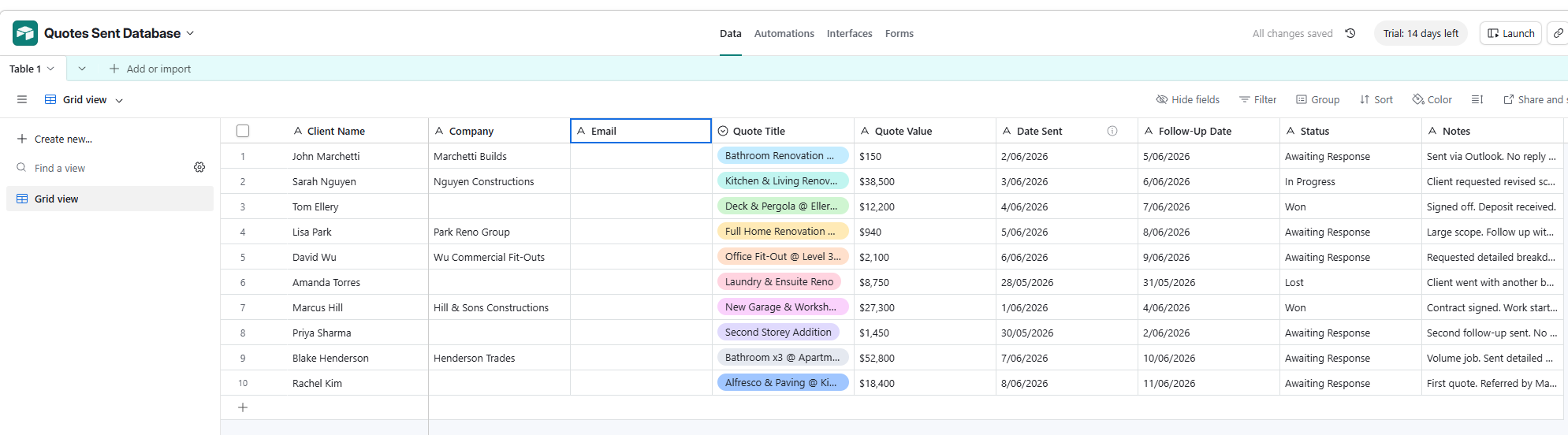
A quote register gives you one place to see every open opportunity and the next follow-up date.
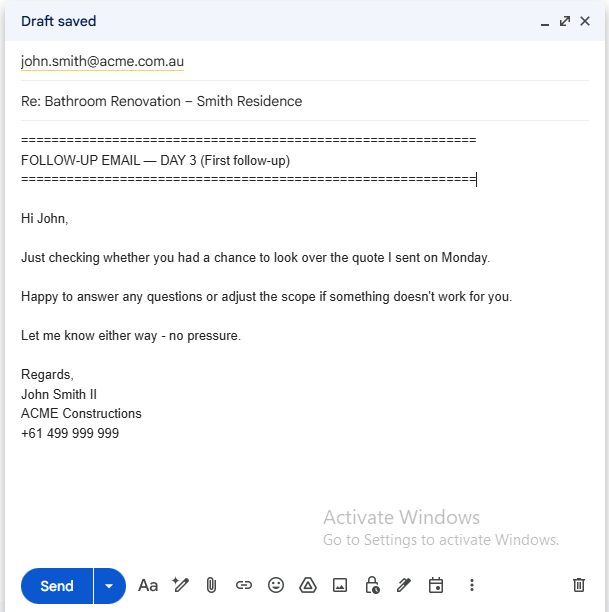
A draft approval step lets your team review follow-up emails before anything is sent.
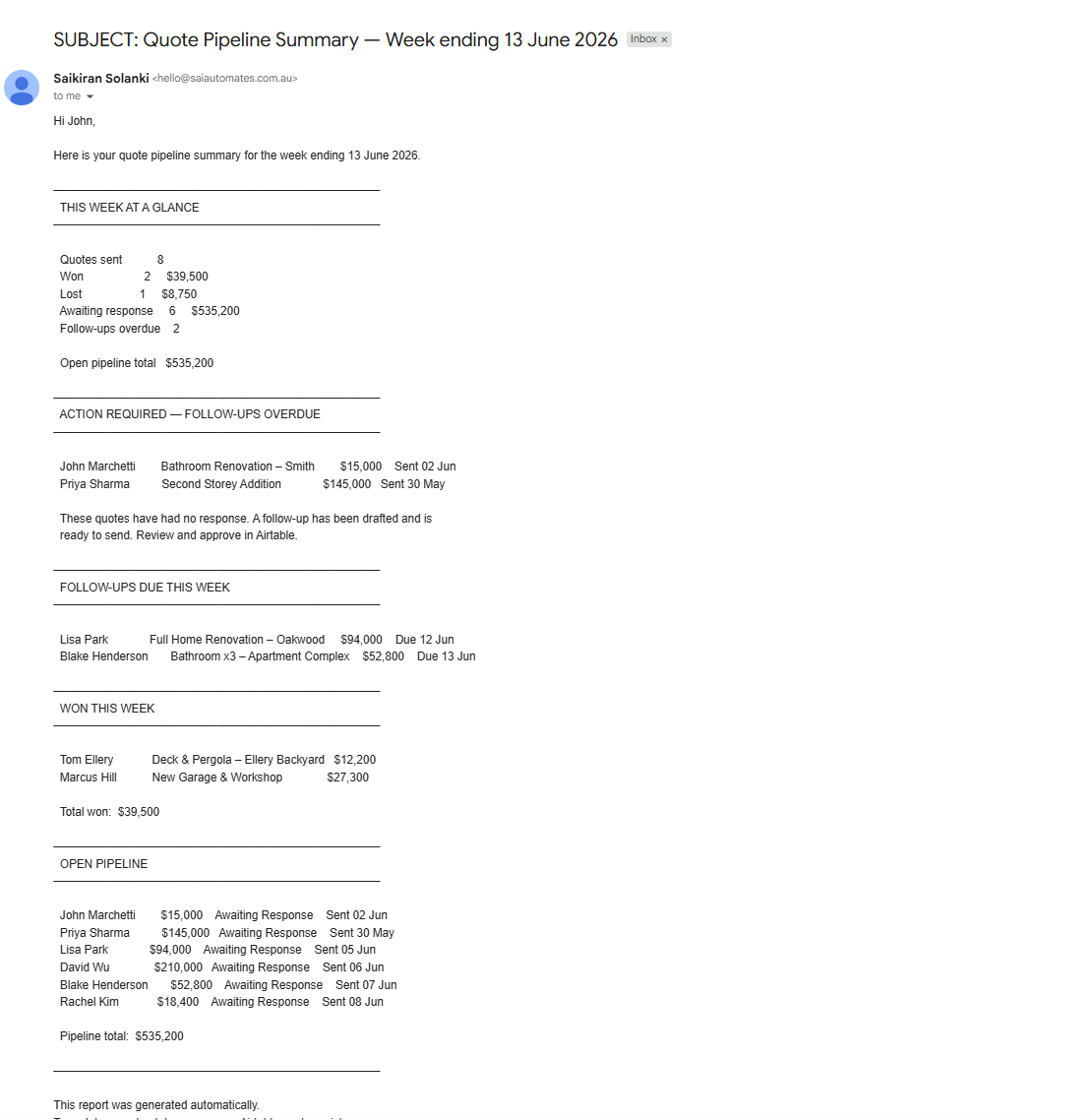
A weekly report shows which quotes need attention and how much revenue is still open.
FAQ
Do I need a CRM?
No.
This can work with Outlook, Gmail, Microsoft 365, Airtable, or Google Sheets.
Can I approve emails before they send?
Yes.
You can use draft-only mode, approval mode, or full automation.
Does it work with Microsoft 365?
Yes.
Many construction businesses already use Microsoft 365, so it is often the best starting point.
What if my quote process is different?
That is normal.
The workflow should match how you already quote, not force you into a new process.
Can this connect to Xero or job management software?
In many cases, yes.
It depends on the software and the data available.
Will this replace my team?
No.
It removes repetitive tracking work so your team can focus on clients and projects.
Who Is This For?
This is useful if you are a:
- Residential builder
- Renovation company
- Commercial construction company
- Trade business
- Subcontractor
- Estimator
- Project manager
- Small construction office team
It is especially useful if you currently track quotes through email and spreadsheets.
If quote follow-up depends on someone remembering, this system is probably relevant.
Request a Free Process Review
Describe your problem. We will tell you how to fix it - free.
You will receive:
- Current workflow assessment
- Automation opportunities
- Estimated software costs
- Suggested technology stack
- Recommended implementation approach
No obligation. No software commitment.
Just a practical solution proposal for your quote follow-up process.
Want this automated for your business?
Tell us the manual task you want to fix. We'll review it and suggest a practical next step.
Contact Us